How to document a workflow in ServiceNow
By Phil KlingUpdated June 2026How we research this
To document a workflow in ServiceNow, record someone performing the real process, an incident resolution, a service request, or a change, then generate a step-by-step SOP and a process map from it. ServiceNow is heavily configured per organization, so a generic guide rarely matches what fulfillers actually see. Ledgerium records the real interaction in the browser and produces the SOP, process map, and a workflow intelligence report, so the documentation reflects your instance and the role doing the work.
Key takeaways
- ServiceNow forms, fields, and routing are configured per organization, so a generic incident or request guide rarely matches what fulfillers see.
- Different ServiceNow fulfiller groups work different steps and fields, which a single written procedure cannot capture.
- Flow Designer automation moves records through steps fulfillers never see, leaving gaps in any from-memory documentation.
- Recording a real incident, service request, or change as the fulfiller works captures the actual forms and assignment routing.
- Ledgerium generates the SOP, process map, and a report highlighting where ServiceNow requests wait from one recorded run.
Common workflows in ServiceNow
- Incident logging and resolution
- Service request fulfillment
- Change request and approval
- Access and onboarding requests
Why documenting them is hard
- Per-org configuration means generic guides do not match real forms
- Different fulfiller groups see different steps and fields
- Automation in Flow Designer hides steps users never see
The old way
An analyst writes the steps from a platform-admin view that fulfillers never use. The guide references fields and actions the actual group does not have, so it is wrong the first time someone follows it.
With Ledgerium
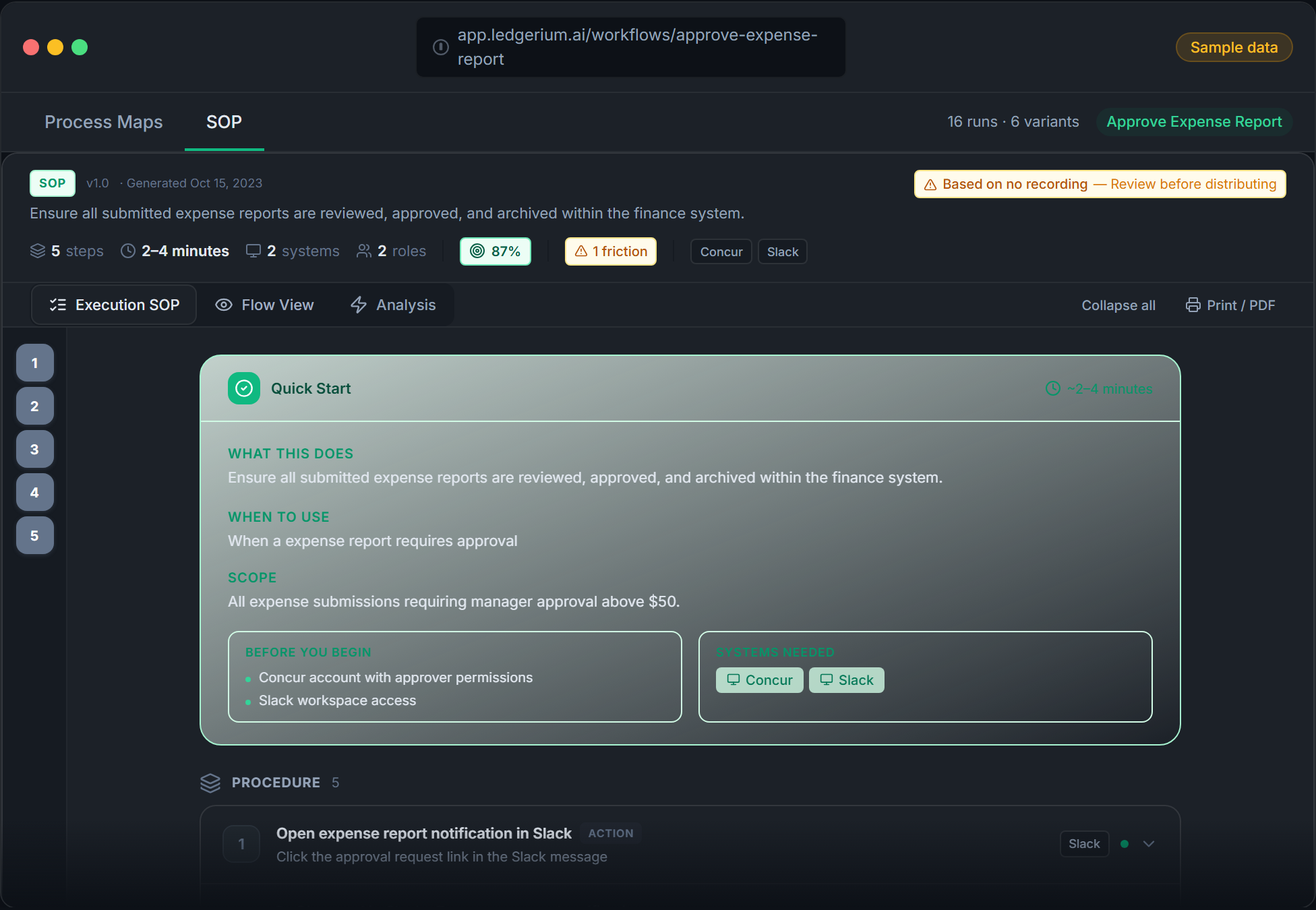
Record the real process as the fulfiller group performs it. Ledgerium captures the actual forms, routing, and steps and generates the SOP, the process map, and a report that highlights where requests wait.
The SOP Ledgerium generates
Common mistakes
- Documenting from an admin view instead of the fulfiller’s real screens
- Skipping the approval and assignment routing that varies by request type
- Stopping at the ServiceNow boundary when the process continues elsewhere
How Ledgerium captures this
ServiceNow is configured so differently per organization that fulfiller groups see their own forms and routing, and Ledgerium records the real fulfillment so the SOP reflects your instance instead of a platform-admin view.
1. Install the extension
Add the Ledgerium recorder to Chrome. No screenshots and no keystrokes are ever captured.
2. Record the real workflow
Perform the process once. Ledgerium captures the structured steps, timing, and system context.
3. Get the output
Receive an SOP, a process map, and a workflow intelligence report generated from the real work.
Worth knowing
Ledgerium captures the browser-based steps in ServiceNow. Flow Designer actions and server-side scripts are not observed directly; document their effect from the user-visible result.
Frequently asked questions
- Record a real run of the process as the fulfiller performs it, then generate the SOP and process map from the recording. The result reflects what that group actually sees and does in your instance.
- ServiceNow is configured per organization, with different forms, fields, and routing. A guide written from a standard or admin view references things your fulfiller group may not have. Recording the real process avoids that mismatch.
- Yes. A single recording captures the steps across ServiceNow and the other browser-based systems in the process, so the SOP reflects the full fulfillment flow.
- It captures what the user does and sees in the browser. Flow Designer actions and server-side scripts are not observed directly, so document their effect from the user-visible result.
- No. This is an independent guide. ServiceNow is a trademark of its owner, and Ledgerium is not affiliated with or endorsed by ServiceNow.
Related to this
Free includes SOPs and process maps for 5 workflows a month. The intelligence layer — bottleneck detection, automation scoring, variation analysis — is on paid plans. See what's included on each plan.
Not ready to sign up? Try the live demo — no login required.
Document a ServiceNow workflow from real work
Record the real process in your own account and generate an SOP, a process map, and an intelligence report that matches what your team actually sees.
Free plan includes 5 documented workflows per month. No screenshots ever captured.
Or Install the extension first.
ServiceNow is a trademark of its respective owner. Ledgerium AI is not affiliated with or endorsed by ServiceNow.